Webpack Configuration File

If we are using Webpack to bundle assets in our project, we can supply a set of options to webpack. This can be done either through command line or creating a webpack.config.js file.
From Webpack 4 onwards, it is not mandatory to supply a configuration file. Webpack takes, its own default configuration if none is provided. Default configuration expects the entry point to be src/index.js and bundle destination to be dist/main.js.
webpack.config.js
If a file with name webpack.config.js is present in the project, when webpack is executed, it respects the options present in that file.
Here is a sample config file:
module.exports = {
  mode: "development",
  entry: "./src/app.js",
};
The config JavaScript file is a CommonJS module. An object is exported from this file which is then considered by Webpack. Above configuration tells following things to webpack while it is running:
- Build the project in
developmentmode. So the output bundle file will contain comments and non-minimized code. Default project mode isproduction. - The entry point of webpack is set to be
app.jsundersrcfolder. From there, webpack starts creating the dependency graph. Default entry point issrc/index.js.
Using Different Config File
By default, Webpack takes configuration details from webpack.config.js. If for some reasons, we need to tell webpack, to take different file as the configuration file, we can use --config flag.
If our new webpack configuration file is named as production.config.js, we can make use of it by running webpack as shown below.
webpack --config production.config.js
Config Generation Tool
Webpack can help us to generate a config file using webpack-cli tool. To generate the file, we can go to the project root in terminal and run:
npx webpack-cli init
Befor running above command, we need
@webpack-cli/generatorsin our project. If it is not present, install it usingnpmoryarn.
When running above command, webpack will ask a set of questions. The process is interactive.
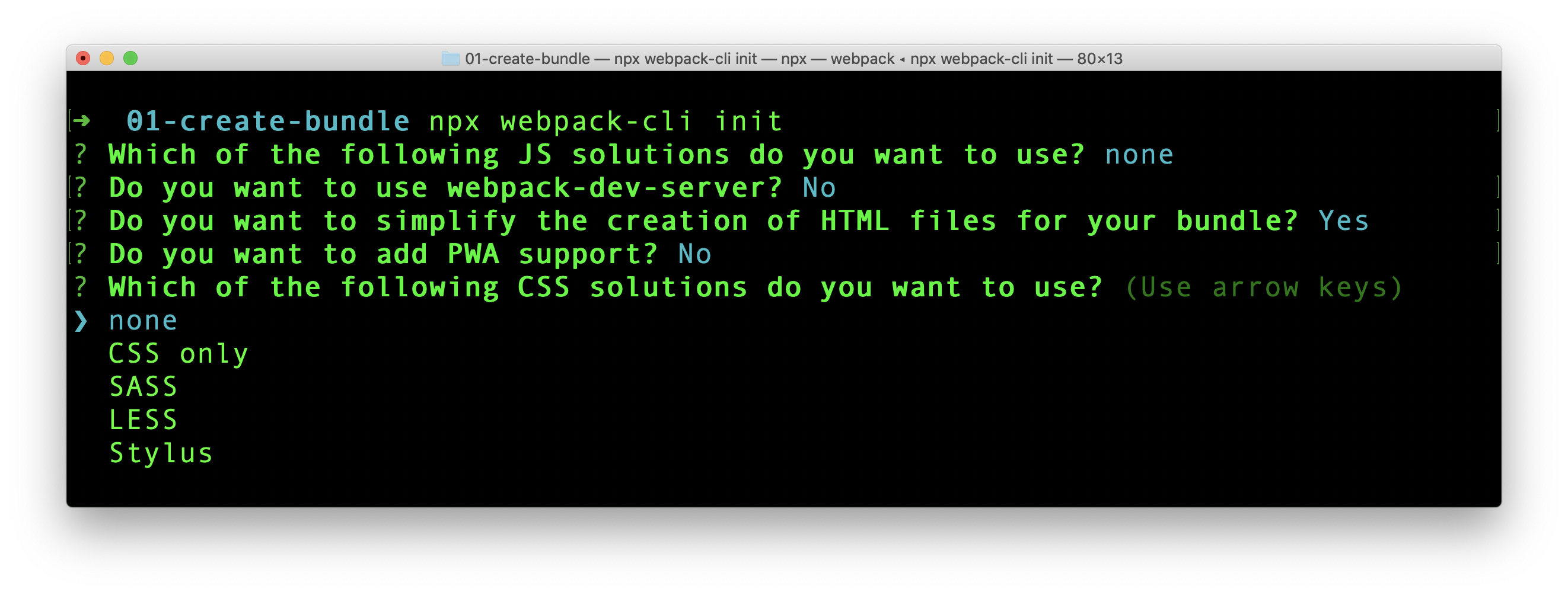
The process will create a boilerplate code with package.json, index.js and webpack.config.js file. If those files are already created in the project, there is option to overwrite or keep them.
Playground
Createapp.dev is a very interactive online application that gives us the configuration required for different project types. Give it a try.