Implementing Forgot Password and Reset Password in Headless Shopify

Password recovery is an essential feature for any e-commerce application. When users forget their passwords, they need a secure and straightforward way to reset them. In this article, we'll implement a complete forgot password and reset password flow for a headless Shopify storefront using Better-Auth and Next.js.
Live Demo: https://headless-shopify-site.vercel.app/
Prerequisites
This article builds upon the authentication system covered in Authentication in Headless Shopify Using Better-Auth and Next.js. Make sure you have:
- ✅ Next.js application with Better-Auth configured
- ✅ Shopify Customer API integration
- ✅ Custom Shopify auth plugin implemented
- ✅ Sign-in and sign-up functionality working
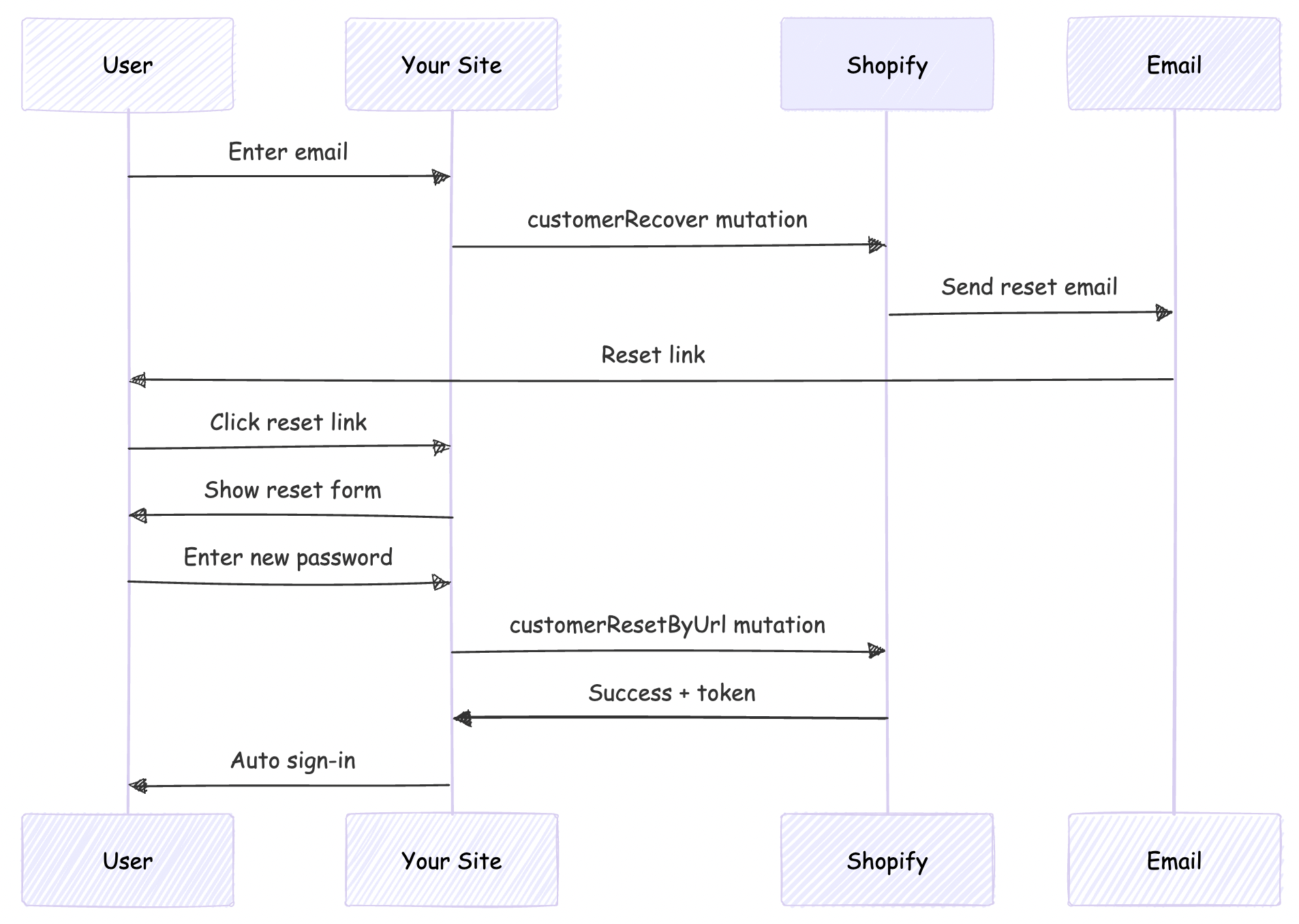
Understanding Shopify's Password Recovery Flow
Shopify provides two mutations for password recovery:
customerRecover: Sends a password reset email to the customercustomerResetByUrl: Resets the password using the URL from the email
The flow works like this:
Reset Password Email URL
This scenario is applicable only if your headless site domain is different from that given as primary domain in Shopify
By default, Shopify's password reset emails point to the Shopify-hosted store (your-store.myshopify.com). For a headless storefront, we need these emails to point to your custom domain instead.
We'll solve this by:
- Customizing Shopify's email templates (discussed later in this post)
- Implementing a reset password page on our site
- Handling the reset flow with Better-Auth
Step 1: Create the Forgot Password GraphQL Mutation
First, create the GraphQL mutation file for customerRecover:
# src/integrations/shopify/customer-recover/customer-recover.shopify.graphql
mutation customerRecover($email: String!) {
  customerRecover(email: $email) {
    customerUserErrors {
      message
      field
    }
  }
}
This mutation triggers Shopify to send a password reset email to the customer.
Step 2: Create the Integration Function
Create the TypeScript integration function:
// src/integrations/shopify/customer-recover/index.ts
import {
  CustomerRecoverDocument,
  CustomerRecoverMutation,
  CustomerRecoverMutationVariables,
} from "@/generated/shopifySchemaTypes";
import createApolloClient from "@/integrations/shopify/shopify-apollo-client";

export const customerRecover = async (
  email: string,
): Promise<CustomerRecoverMutation | undefined> => {
  try {
    const client = createApolloClient();
    const { data } = await client.mutate<
      CustomerRecoverMutation,
      CustomerRecoverMutationVariables
    >({
      mutation: CustomerRecoverDocument,
      variables: { email },
    });

    if (!data) {
      throw new Error("No data returned from customerRecover mutation");
    }

    return data;
  } catch (error) {
    console.error("Error sending password reset email:", error);
  }
};
Note: Run your GraphQL codegen after creating the mutation file:
npm run codegen
Step 3: Add Forgot Password to Better-Auth Plugin
Update your Shopify auth plugin to include the forgot password endpoint:
Add Types
// src/lib/shopify-auth-plugin.ts
export type ShopifyForgotPasswordInput = {
  email: string;
};
Add Validation Schema
import * as z from "zod";

const forgotPasswordSchema = z.object({
  email: z.email().min(1),
});
Create the Endpoint
import { customerRecover } from "@/integrations/shopify/customer-recover";

export const shopifyAuthPlugin = () => {
  return {
    id: "shopify-auth",
    endpoints: {
      // ... existing signIn and signUp endpoints

      forgotPassword: createAuthEndpoint(
        "/shopify-auth/forgot-password",
        {
          method: "POST",
          body: forgotPasswordSchema,
        },
        async (ctx) => {
          const { email } = ctx.body;

          const result = await customerRecover(email);

          if (!result) {
            throw new APIError("BAD_REQUEST", {
              message: "Unable to send password reset email.",
            });
          }

          const payload = result.customerRecover;
          const userErrors = payload?.customerUserErrors ?? [];

          if (userErrors.length) {
            throw new APIError("BAD_REQUEST", {
              message:
                userErrors[0]?.message ||
                "Unable to send password reset email.",
            });
          }

          return ctx.json({ ok: true });
        },
      ),
    },
  } satisfies BetterAuthPlugin;
};
Step 4: Add Client-Side Action
Update your auth client plugin to expose the forgot password action:
// src/lib/shopify-auth-client.ts
import type {
  ShopifyForgotPasswordInput,
} from "@/lib/shopify-auth-plugin";

export const shopifyAuthClientPlugin = () => {
  return {
    id: "shopify-auth",
    $InferServerPlugin: {} as ReturnType<typeof shopifyAuthPlugin>,
    getActions: ($fetch) => {
      return {
        // ... existing shopifySignIn and shopifySignUp

        shopifyForgotPassword: async (
          data: ShopifyForgotPasswordInput,
          fetchOptions?: BetterFetchOption,
        ) => {
          return $fetch("/shopify-auth/forgot-password", {
            method: "POST",
            body: data,
            ...fetchOptions,
          });
        },
      };
    },
  } satisfies BetterAuthClientPlugin;
};
Step 5: Create the Forgot Password Page
Create a user-friendly forgot password page:
// src/app/account/forgot-password/page.tsx
"use client";

import React, { useState } from "react";
import Link from "next/link";
import { authClient } from "@/lib/auth-client";

export default function ForgotPasswordPage() {
  const [loading, setLoading] = useState(false);
  const [error, setError] = useState<string | null>(null);
  const [success, setSuccess] = useState(false);

  async function onSubmit(e: React.FormEvent<HTMLFormElement>) {
    e.preventDefault();
    setError(null);
    setSuccess(false);
    setLoading(true);

    const form = e.currentTarget;
    const email = (form.elements.namedItem("email") as HTMLInputElement).value;

    try {
      const result = await authClient.shopifyForgotPassword({ email });

      const shopifyError = (result as { error?: { message?: string } })?.error
        ?.message;
      if (shopifyError) {
        setError(shopifyError || "Unable to send password reset email.");
        return;
      }

      const shopifyData = (result as { data?: { ok?: boolean } })?.data;
      if (!shopifyData?.ok) {
        setError("Unable to send password reset email.");
        return;
      }

      setSuccess(true);
    } catch {
      setError("Unable to send password reset email. Please try again.");
    } finally {
      setLoading(false);
    }
  }

  return (
    <div className="border-box px-5 py-8 lg:px-10 min-h-[60vh] flex items-center justify-center">
      <div className="w-full max-w-md">
        <h1 className="text-2xl font-semibold text-gray-900 text-center mb-4">
          Forgot Password
        </h1>
        <p className="text-gray-500 text-center mb-8 font-light">
          Enter your email address and we'll send you a link to reset your
          password.
        </p>

        {success ? (
          <div className="bg-green-50 border border-green-200 text-green-800 px-4 py-3 rounded">
            <p className="text-sm">
              If an account exists with this email, you will receive a password
              reset link shortly.
            </p>
          </div>
        ) : (
          <form className="flex flex-col gap-4" onSubmit={onSubmit}>
            <div className="flex flex-col gap-2">
              <label htmlFor="email" className="text-gray-900">
                Email
              </label>
              <input
                type="email"
                id="email"
                name="email"
                className="border border-gray-200 px-4 py-2 text-gray-900 focus:outline-none focus:border-gray-400"
                placeholder="you@example.com"
                required
              />
            </div>

            {error && (
              <p className="text-sm text-red-600" role="alert">
                {error}
              </p>
            )}

            <button
              type="submit"
              disabled={loading}
              className="mt-4 bg-gray-900 text-white py-3 px-4 hover:bg-gray-800 transition-colors cursor-pointer uppercase disabled:opacity-50 disabled:cursor-not-allowed"
            >
              {loading ? "Sending..." : "Send Reset Link"}
            </button>
          </form>
        )}

        <div className="mt-6 flex flex-col items-center gap-4">
          <Link
            href="/account/login"
            className="text-gray-600 hover:text-gray-900 font-light"
          >
            Back to Login
          </Link>
        </div>
      </div>
    </div>
  );
}
Step 6: Customize Shopify Email Template
This is the crucial step that redirects users to your site instead of Shopify's hosted store.
Access Email Templates
- Go to your Shopify Admin
- Navigate to Settings → Notifications
- Find Customer account password reset
- Click to edit the template
Update the Reset URL
Find the line containing the reset password link (typically):
{{ customer.reset_password_url }}
Replace it with:
https://your-vercel-domain.com/account/reset-password?url={{ customer.reset_password_url | url_encode }}
Example:
<!-- Before -->
<a href="{{ customer.reset_password_url }}">Reset your password</a>

<!-- After -->
<a href="https://headless-shopify-site.vercel.app/account/reset-password?url={{ customer.reset_password_url | url_encode }}">Reset your password</a>
Replace headless-shopify-site.vercel.app with your actual domain.
Step 7: Implement Password Reset Functionality
Now implement the actual password reset page that users land on after clicking the email link.
Create the GraphQL Mutation
# src/integrations/shopify/customer-reset-by-url/customer-reset-by-url.shopify.graphql
mutation customerResetByUrl($password: String!, $resetUrl: URL!) {
  customerResetByUrl(password: $password, resetUrl: $resetUrl) {
    customer {
      id
      email
      firstName
      lastName
    }
    customerAccessToken {
      accessToken
      expiresAt
    }
    customerUserErrors {
      message
      field
    }
  }
}
Create the Integration Function
// src/integrations/shopify/customer-reset-by-url/index.ts
import {
  CustomerResetByUrlDocument,
  CustomerResetByUrlMutation,
  CustomerResetByUrlMutationVariables,
} from "@/generated/shopifySchemaTypes";
import createApolloClient from "@/integrations/shopify/shopify-apollo-client";

export const customerResetByUrl = async (
  password: string,
  resetUrl: string,
): Promise<CustomerResetByUrlMutation | undefined> => {
  try {
    const client = createApolloClient();
    const { data } = await client.mutate<
      CustomerResetByUrlMutation,
      CustomerResetByUrlMutationVariables
    >({
      mutation: CustomerResetByUrlDocument,
      variables: { password, resetUrl },
    });

    if (!data) {
      throw new Error("No data returned from customerResetByUrl mutation");
    }

    return data;
  } catch (error) {
    console.error("Error resetting password:", error);
  }
};
Run codegen again:
npm run codegen
Step 8: Add Reset Password to Auth Plugin
Add Types
// src/lib/shopify-auth-plugin.ts
export type ShopifyResetPasswordInput = {
  password: string;
  resetUrl: string;
};
Add Validation Schema
const resetPasswordSchema = z.object({
  password: z.string().min(5),
  resetUrl: z.string().url(),
});
Create the Endpoint
import { customerResetByUrl } from "@/integrations/shopify/customer-reset-by-url";

export const shopifyAuthPlugin = () => {
  return {
    id: "shopify-auth",
    endpoints: {
      // ... existing endpoints

      resetPassword: createAuthEndpoint(
        "/shopify-auth/reset-password",
        {
          method: "POST",
          body: resetPasswordSchema,
        },
        async (ctx) => {
          const { password, resetUrl } = ctx.body;

          const result = await customerResetByUrl(password, resetUrl);

          if (!result) {
            throw new APIError("BAD_REQUEST", {
              message: "Unable to reset password.",
            });
          }

          const payload = result.customerResetByUrl;
          const userErrors = payload?.customerUserErrors ?? [];
          const token = payload?.customerAccessToken?.accessToken;
          const expiresAt = payload?.customerAccessToken?.expiresAt;

          if (userErrors.length || !token) {
            throw new APIError("BAD_REQUEST", {
              message: userErrors[0]?.message || "Unable to reset password.",
            });
          }

          // Auto sign-in after successful password reset
          ctx.setCookie(SHOPIFY_CUSTOMER_TOKEN_COOKIE, token, {
            httpOnly: true,
            secure: process.env.NODE_ENV === "production",
            sameSite: "lax",
            path: "/",
            expires: expiresAt ? new Date(expiresAt) : undefined,
          });

          return ctx.json({ ok: true });
        },
      ),
    },
  } satisfies BetterAuthPlugin;
};
Step 9: Add Client-Side Reset Action
// src/lib/shopify-auth-client.ts
import type {
  ShopifyResetPasswordInput,
} from "@/lib/shopify-auth-plugin";

export const shopifyAuthClientPlugin = () => {
  return {
    id: "shopify-auth",
    getActions: ($fetch) => {
      return {
        // ... existing actions

        shopifyResetPassword: async (
          data: ShopifyResetPasswordInput,
          fetchOptions?: BetterFetchOption,
        ) => {
          return $fetch("/shopify-auth/reset-password", {
            method: "POST",
            body: data,
            ...fetchOptions,
          });
        },
      };
    },
  } satisfies BetterAuthClientPlugin;
};
Step 10: Create the Reset Password Page
Create a comprehensive reset password page with validation:
// src/app/account/reset-password/page.tsx
"use client";

import React, { useState, useEffect } from "react";
import Link from "next/link";
import { useSearchParams } from "next/navigation";
import { authClient } from "@/lib/auth-client";

export default function ResetPasswordPage() {
  const searchParams = useSearchParams();
  const [loading, setLoading] = useState(false);
  const [error, setError] = useState<string | null>(null);
  const [success, setSuccess] = useState(false);
  const [resetUrl, setResetUrl] = useState<string | null>(null);

  useEffect(() => {
    // Extract the full reset URL from query params
    const url = searchParams.get("url");
    if (url) {
      setResetUrl(decodeURIComponent(url));
    } else {
      setError("Invalid or missing reset link.");
    }
  }, [searchParams]);

  async function onSubmit(e: React.FormEvent<HTMLFormElement>) {
    e.preventDefault();
    setError(null);
    setLoading(true);

    const form = e.currentTarget;
    const password = (form.elements.namedItem("password") as HTMLInputElement)
      .value;
    const confirmPassword = (
      form.elements.namedItem("confirmPassword") as HTMLInputElement
    ).value;

    // Validate passwords match
    if (password !== confirmPassword) {
      setError("Passwords do not match.");
      setLoading(false);
      return;
    }

    // Validate password length
    if (password.length < 5) {
      setError("Password must be at least 5 characters.");
      setLoading(false);
      return;
    }

    if (!resetUrl) {
      setError("Invalid reset link.");
      setLoading(false);
      return;
    }

    try {
      const result = await authClient.shopifyResetPassword({
        password,
        resetUrl,
      });

      const shopifyError = (result as { error?: { message?: string } })?.error
        ?.message;
      if (shopifyError) {
        setError(shopifyError || "Unable to reset password.");
        return;
      }

      const shopifyData = (result as { data?: { ok?: boolean } })?.data;
      if (!shopifyData?.ok) {
        setError("Unable to reset password.");
        return;
      }

      setSuccess(true);

      // Redirect to home after successful reset and auto sign-in
      setTimeout(() => {
        window.location.href = "/";
      }, 2000);
    } catch {
      setError("Unable to reset password. Please try again.");
    } finally {
      setLoading(false);
    }
  }

  if (!resetUrl && !error) {
    return (
      <div className="border-box px-5 py-8 lg:px-10 min-h-[60vh] flex items-center justify-center">
        <div className="w-full max-w-md text-center">
          <p className="text-gray-500">Loading...</p>
        </div>
      </div>
    );
  }

  return (
    <div className="border-box px-5 py-8 lg:px-10 min-h-[60vh] flex items-center justify-center">
      <div className="w-full max-w-md">
        <h1 className="text-2xl font-semibold text-gray-900 text-center mb-4">
          Reset Password
        </h1>
        <p className="text-gray-500 text-center mb-8 font-light">
          Enter your new password below.
        </p>

        {success ? (
          <div className="bg-green-50 border border-green-200 text-green-800 px-4 py-3 rounded">
            <p className="text-sm">
              Your password has been reset successfully! Redirecting...
            </p>
          </div>
        ) : (
          <form className="flex flex-col gap-4" onSubmit={onSubmit}>
            <div className="flex flex-col gap-2">
              <label htmlFor="password" className="text-gray-900">
                New Password
              </label>
              <input
                type="password"
                id="password"
                name="password"
                className="border border-gray-200 px-4 py-2 text-gray-900 focus:outline-none focus:border-gray-400"
                placeholder="••••••••"
                minLength={5}
                required
                disabled={!resetUrl}
              />
            </div>

            <div className="flex flex-col gap-2">
              <label htmlFor="confirmPassword" className="text-gray-900">
                Confirm New Password
              </label>
              <input
                type="password"
                id="confirmPassword"
                name="confirmPassword"
                className="border border-gray-200 px-4 py-2 text-gray-900 focus:outline-none focus:border-gray-400"
                placeholder="••••••••"
                minLength={5}
                required
                disabled={!resetUrl}
              />
            </div>

            {error && (
              <p className="text-sm text-red-600" role="alert">
                {error}
              </p>
            )}

            <button
              type="submit"
              disabled={loading || !resetUrl}
              className="mt-4 bg-gray-900 text-white py-3 px-4 hover:bg-gray-800 transition-colors cursor-pointer uppercase disabled:opacity-50 disabled:cursor-not-allowed"
            >
              {loading ? "Resetting..." : "Reset Password"}
            </button>
          </form>
        )}

        <div className="mt-6 flex flex-col items-center gap-4">
          <Link
            href="/account/login"
            className="text-gray-600 hover:text-gray-900 font-light"
          >
            Back to Login
          </Link>
        </div>
      </div>
    </div>
  );
}
Project Structure
Your final project structure should look like this:
src/
├── app/
│   └── account/
│       ├── forgot-password/
│       │   └── page.tsx          # Forgot password form
│       └── reset-password/
│           └── page.tsx           # Reset password form
├── integrations/
│   └── shopify/
│       ├── customer-recover/
│       │   ├── customer-recover.shopify.graphql
│       │   └── index.ts
│       └── customer-reset-by-url/
│           ├── customer-reset-by-url.shopify.graphql
│           └── index.ts
└── lib/
    ├── auth-client.ts             # Better-Auth client
    ├── shopify-auth-plugin.ts     # Server plugin with endpoints
    └── shopify-auth-client.ts     # Client plugin with actions
Conclusion
You now have a complete, secure password recovery system for your headless Shopify storefront!
Resources
- Better-Auth Documentation: https://www.better-auth.com/
- Shopify Storefront API: https://shopify.dev/docs/api/storefront
- Demo Project: https://github.com/jobyjoseph/headless-shopify
- Live Demo: https://headless-shopify-site.vercel.app/
Questions?
If you have questions or run into issues implementing this flow, feel free to:
- Open an issue on the GitHub repository
- Check the Better-Auth documentation
- Review the Shopify Customer API docs
Happy coding! 🚀