Show Product Preview Page Using Next.js Draft Mode
· 5 min read

In a headless Shopify storefront, you often need to preview a product page before publishing content changes. Next.js Draft Mode gives a clean way to do this in development.
In a headless Shopify storefront, you often need to preview a product page before publishing content changes. Next.js Draft Mode gives a clean way to do this in development.
This post explains how you can quickly generate a Shopify admin token for your app.
Social login has become a standard feature in modern e-commerce applications, offering users a convenient way to sign in without creating new credentials. In this article, we'll explore how to implement Google Social Login in a headless Shopify storefront using Better-Auth and Shopify Multipass.
Note: The live demo site uses a Shopify Partner development store which doesn't support Multipass (Multipass is only available on Shopify Plus plans). However, the complete working implementation of Google social login is available in the GitHub repository. You can refer to the codebase for a fully functional example.
Shopify Multipass is a feature available on Shopify Plus that allows you to authenticate customers from an external identity provider. When a user signs in through a third-party service (like Google), you generate a Multipass token that Shopify uses to create or sign in the customer automatically.
Before implementing Google social login, ensure you have:
If you haven't set up basic Better-Auth authentication yet, check out the article on implementing authentication in headless Shopify.
Add the required environment variables for Google OAuth and Shopify Multipass:
# .env
BETTER_AUTH_URL=http://localhost:3000
BETTER_AUTH_SECRET=your_better_auth_secret

# Google OAuth
GOOGLE_CLIENT_ID=your_google_client_id
GOOGLE_CLIENT_SECRET=your_google_client_secret

# Shopify Multipass
SHOPIFY_MULTIPASS_SECRET=your_shopify_multipass_secret
http://localhost:3000/api/auth/callback/google (for development)https://yourdomain.com/api/auth/callback/google (for production)Update your Better-Auth configuration to include the Google social provider:
// src/lib/auth.ts
import { betterAuth } from "better-auth";
import { nextCookies } from "better-auth/next-js";
import { shopifyAuthPlugin } from "@/lib/shopify-auth-plugin";

export const auth = betterAuth({
  baseURL: process.env.BETTER_AUTH_URL,
  plugins: [nextCookies(), shopifyAuthPlugin()],
  // 👇 Google OAuth configuration
  socialProviders: {
    google: {
      clientId: process.env.GOOGLE_CLIENT_ID as string,
      clientSecret: process.env.GOOGLE_CLIENT_SECRET as string,
    },
  },
  // 👆 Add your Google credentials here
});
This configuration:
nextCookies() for cookie management in Next.jsshopifyAuthPlugin for Shopify-specific auth flowsThe socialProviders.google object is where you configure Google OAuth. Make sure to add your Google Client ID and Client Secret from the Google Cloud Console.
Create a utility function to generate Multipass tokens:
// src/lib/shopify/multipass.ts
import Multipassify from "multipassify";

export const SHOPIFY_MULTIPASS_SECRET = process.env.SHOPIFY_MULTIPASS_SECRET;

export function generateMultipassToken(email: string): string {
  if (!SHOPIFY_MULTIPASS_SECRET) {
    throw new Error("SHOPIFY_MULTIPASS_SECRET is not configured.");
  }

  const multipassify = new Multipassify(SHOPIFY_MULTIPASS_SECRET);

  return multipassify.encode({ email });
}
Install the multipassify package:
pnpm add multipassify
# or
npm install multipassify
Create a GraphQL mutation to exchange the Multipass token for a Shopify customer access token:
# src/integrations/shopify/customer-access-token-create-with-multipass/
# customer-access-token-create-with-multipass.shopify.graphql

mutation customerAccessTokenCreateWithMultipass($multipassToken: String!) {
  customerAccessTokenCreateWithMultipass(multipassToken: $multipassToken) {
    customerAccessToken {
      accessToken
      expiresAt
    }
    customerUserErrors {
      message
      field
    }
  }
}
Create the integration function:
// src/integrations/shopify/customer-access-token-create-with-multipass/index.ts
import {
  CustomerAccessTokenCreateWithMultipassDocument,
  CustomerAccessTokenCreateWithMultipassMutation,
  CustomerAccessTokenCreateWithMultipassMutationVariables,
} from "@/generated/shopifySchemaTypes";
import createApolloClient from "@/integrations/shopify/shopify-apollo-client";

export const customerAccessTokenCreateWithMultipass = async (
  multipassToken: string,
): Promise<CustomerAccessTokenCreateWithMultipassMutation | undefined> => {
  try {
    const client = createApolloClient();
    const { data } = await client.mutate<
      CustomerAccessTokenCreateWithMultipassMutation,
      CustomerAccessTokenCreateWithMultipassMutationVariables
    >({
      mutation: CustomerAccessTokenCreateWithMultipassDocument,
      variables: { multipassToken },
    });

    if (!data) {
      throw new Error(
        "No data returned from customerAccessTokenCreateWithMultipass mutation",
      );
    }

    return data;
  } catch (error) {
    console.error(
      "Error creating customer access token with multipass:",
      error,
    );
  }
};
Create a Next.js API route that handles the Multipass authentication flow:
// src/app/api/shopify/multipass/route.ts
import { NextResponse } from "next/server";
import { z } from "zod";

import { customerAccessTokenCreateWithMultipass } from "@/integrations/shopify/customer-access-token-create-with-multipass";
import { generateMultipassToken } from "@/lib/shopify/multipass";

const requestSchema = z.object({
  email: z.string(),
});

export async function POST(request: Request) {
  const parsed = requestSchema.safeParse(
    await request.json().catch(() => ({})),
  );

  if (!parsed.success) {
    return NextResponse.json(
      { error: "Invalid request body." },
      { status: 400 },
    );
  }

  const { email } = parsed.data;

  let multipassToken: string;

  try {
    multipassToken = generateMultipassToken(email);
  } catch (error) {
    console.error("Error generating multipass token:", error);
    return NextResponse.json(
      { error: "Multipass is not configured." },
      { status: 500 },
    );
  }

  try {
    const result = await customerAccessTokenCreateWithMultipass(multipassToken);
    const payload = result?.customerAccessTokenCreateWithMultipass;
    const userErrors = payload?.customerUserErrors ?? [];
    const token = payload?.customerAccessToken?.accessToken;
    const expiresAt = payload?.customerAccessToken?.expiresAt;

    if (userErrors.length || !token) {
      return NextResponse.json(
        { error: userErrors[0]?.message || "Unable to create access token." },
        { status: 401 },
      );
    }

    const response = NextResponse.json({ accessToken: token, expiresAt });

    response.cookies.set("shopifyCustomerAccessToken", token, {
      httpOnly: true,
      secure: process.env.NODE_ENV === "production",
      sameSite: "lax",
      path: "/",
      expires: expiresAt ? new Date(expiresAt) : undefined,
    });

    return response;
  } catch (error) {
    console.error("Error creating access token with multipass:", error);
    return NextResponse.json(
      { error: "Unable to create access token." },
      { status: 500 },
    );
  }
}
This endpoint:
Now create the login page that integrates Google OAuth:
// src/app/account/login/page.tsx
"use client";
import React, { useCallback, useEffect, useState } from "react";
import Link from "next/link";
import { authClient } from "@/lib/auth-client";
import Cookies from "js-cookie";
export default function LoginPage() {
const { data: session } = authClient.useSession();
const [loading, setLoading] = useState(false);
const [googleLoading, setGoogleLoading] = useState(false);
const [processedSocialEmail, setProcessedSocialEmail] = useState<
string | null
>(null);
const [error, setError] = useState<string | null>(null);
const updateCartBuyerIdentity = useCallback(async () => {
const cartId = Cookies.get("cart_id");
if (!cartId) {
return;
}
await fetch("/api/shopify/cart-buyer-identity", {
method: "POST",
headers: {
"Content-Type": "application/json",
},
body: JSON.stringify({ cartId }),
});
}, []);
useEffect(() => {
const socialEmail = session?.user?.email;
if (!socialEmail || socialEmail === processedSocialEmail) {
return;
}
let cancelled = false;
async function authenticateSocialUserWithMultipass() {
setGoogleLoading(true);
setError(null);
try {
const response = await fetch("/api/shopify/multipass", {
method: "POST",
headers: {
"Content-Type": "application/json",
},
body: JSON.stringify({ email: socialEmail }),
});
const payload = (await response.json().catch(() => ({}))) as {
error?: string;
};
if (!response.ok) {
throw new Error(payload.error || "Unable to sign in with Google.");
}
if (cancelled) {
return;
}
setProcessedSocialEmail(socialEmail);
await updateCartBuyerIdentity();
window.location.href = "/";
} catch (err) {
if (cancelled) {
return;
}
setError(
err instanceof Error ? err.message : "Unable to sign in with Google.",
);
} finally {
if (!cancelled) {
setGoogleLoading(false);
}
}
}
authenticateSocialUserWithMultipass();
return () => {
cancelled = true;
};
}, [processedSocialEmail, session?.user?.email, updateCartBuyerIdentity]);
async function onGoogleSignIn() {
setError(null);
setGoogleLoading(true);
try {
const socialSignInResult = await authClient.signIn.social({
provider: "google",
callbackURL: "/account/login",
});
const socialSignInError = (
socialSignInResult as { error?: { message?: string } }
)?.error?.message;
if (socialSignInError) {
setError(socialSignInError || "Unable to start Google sign in.");
}
} catch {
setError("Unable to start Google sign in.");
} finally {
setGoogleLoading(false);
}
}
async function onSubmit(e: React.FormEvent<HTMLFormElement>) {
e.preventDefault();
setError(null);
setLoading(true);
const form = e.currentTarget;
const email = (form.elements.namedItem("email") as HTMLInputElement).value;
const password = (form.elements.namedItem("password") as HTMLInputElement)
.value;
try {
const shopifyAuth = await authClient.shopifySignIn({
email,
password,
});
const shopifyError = (shopifyAuth as { error?: { message?: string } })
?.error?.message;
if (shopifyError) {
setError(shopifyError || "Invalid email or password.");
return;
}
const shopifyData = (shopifyAuth as { data?: { ok?: boolean } })?.data;
if (!shopifyData?.ok) {
setError("Invalid email or password.");
return;
}
await updateCartBuyerIdentity();
window.location.href = "/";
} catch {
setError("Unable to sign in. Please try again.");
} finally {
setLoading(false);
}
}
return (
<div className="border-box px-5 py-8 lg:px-10 min-h-[60vh] flex items-center justify-center">
<div className="w-full max-w-md">
<h1 className="text-2xl font-semibold text-gray-900 text-center mb-8 ">
Login
</h1>
<form className="flex flex-col gap-4" onSubmit={onSubmit}>
<div className="flex flex-col gap-2">
<label htmlFor="email" className="text-gray-900">
Email
</label>
<input
type="email"
id="email"
name="email"
className="border border-gray-200 px-4 py-2 text-gray-900 focus:outline-none focus:border-gray-400"
placeholder="you@example.com"
required
/>
</div>
<div className="flex flex-col gap-2">
<label htmlFor="password" className="text-gray-900">
Password
</label>
<input
type="password"
id="password"
name="password"
className="border border-gray-200 px-4 py-2 text-gray-900 focus:outline-none focus:border-gray-400"
placeholder="••••••••"
required
/>
</div>
{error && (
<p className="text-sm text-red-600" role="alert">
{error}
</p>
)}
<button
type="submit"
disabled={loading || googleLoading}
className="mt-4 bg-gray-900 text-white py-3 px-4 hover:bg-gray-800 transition-colors cursor-pointer uppercase disabled:opacity-60"
>
{loading ? "Signing In..." : "Sign In"}
</button>
<button
type="button"
onClick={onGoogleSignIn}
disabled={loading || googleLoading}
className="border border-gray-900 text-gray-900 py-3 px-4 hover:bg-gray-100 transition-colors cursor-pointer uppercase disabled:opacity-60"
>
{googleLoading
? "Signing In With Google..."
: "Sign In with Google"}
</button>
</form>
<div className="mt-6 flex flex-col items-center gap-4">
<Link
href="/account/forgot-password"
className="text-gray-600 hover:text-gray-900 font-light"
>
Forgot your password?
</Link>
<p className="text-gray-500 font-light">
Don't have an account?{" "}
<Link
href="/account/register"
className="text-gray-600 hover:text-gray-900 font-light"
>
Create one
</Link>
</p>
</div>
</div>
</div>
);
}
useEffect hook watches for Better-Auth session changes after Google OAuth callbackprocessedSocialEmail state prevents duplicate Multipass callsCreate a session provider to manage user state across your application:
// src/providers/session-provider.tsx
"use client";

import {
  createContext,
  useCallback,
  useContext,
  useEffect,
  useState,
} from "react";
import { getCurrentUser } from "@/lib/shopify/getCurrentUser";

type SessionUser = Awaited<ReturnType<typeof getCurrentUser>>;

type SessionContextValue = {
  user: SessionUser;
  loading: boolean;
  error: string | null;
  refresh: () => Promise<void>;
};

const SessionContext = createContext<SessionContextValue | undefined>(
  undefined,
);

export function SessionProvider({ children }: { children: React.ReactNode }) {
  const [user, setUser] = useState<SessionUser>(null);
  const [loading, setLoading] = useState(true);
  const [error, setError] = useState<string | null>(null);

  const refresh = useCallback(async () => {
    try {
      setLoading(true);
      setError(null);
      const currentUser = await getCurrentUser();
      setUser(currentUser);
    } catch (err) {
      setError(err instanceof Error ? err.message : "Failed to load user");
      setUser(null);
    } finally {
      setLoading(false);
    }
  }, []);

  useEffect(() => {
    refresh();
  }, [refresh]);

  return (
    <SessionContext.Provider value={{ user, loading, error, refresh }}>
      {children}
    </SessionContext.Provider>
  );
}

export function useSession() {
  const context = useContext(SessionContext);
  if (!context) {
    throw new Error("useSession must be used within a SessionProvider");
  }
  return context;
}
Create the getCurrentUser utility:
// src/lib/shopify/getCurrentUser.ts
export const getCurrentUser = async () => {
  try {
    const response = await fetch("/api/shopify/customer", {
      credentials: "include",
      headers: {
        "Content-Type": "application/json",
      },
    });

    if (!response.ok) {
      if (response.status === 401) {
        return null;
      }
      return null;
    }

    const data = await response.json();
    const customer = data?.customer ?? null;

    if (!customer) {
      return null;
    }

    const name = [customer.firstName, customer.lastName]
      .filter(Boolean)
      .join(" ")
      .trim();

    return {
      ...customer,
      name: name || undefined,
    };
  } catch {
    return null;
  }
};
Let's break down what happens when a user clicks "Sign In with Google":
authClient.signIn.social({
  provider: "google",
  callbackURL: "/account/login",
});
/account/login with auth tokensauthClient.useSession() hook detects the new sessionconst multipassToken = generateMultipassToken(email);
customerAccessTokenCreateWithMultipass(multipassToken);
response.cookies.set("shopifyCustomerAccessToken", token, {
  httpOnly: true,
  secure: process.env.NODE_ENV === "production",
  sameSite: "lax",
  path: "/",
});
Implementing Google social login in a headless Shopify storefront requires coordinating several technologies:
This architecture provides a secure, user-friendly authentication experience while maintaining compatibility with Shopify's customer system. The approach can be extended to other OAuth providers (GitHub, Facebook, etc.) using the same Multipass integration pattern.
Password recovery is an essential feature for any e-commerce application. When users forget their passwords, they need a secure and straightforward way to reset them. In this article, we'll implement a complete forgot password and reset password flow for a headless Shopify storefront using Better-Auth and Next.js.
Live Demo: https://headless-shopify-site.vercel.app/
This article builds upon the authentication system covered in Authentication in Headless Shopify Using Better-Auth and Next.js. Make sure you have:
Shopify provides two mutations for password recovery:
customerRecover: Sends a password reset email to the customercustomerResetByUrl: Resets the password using the URL from the emailThe flow works like this:
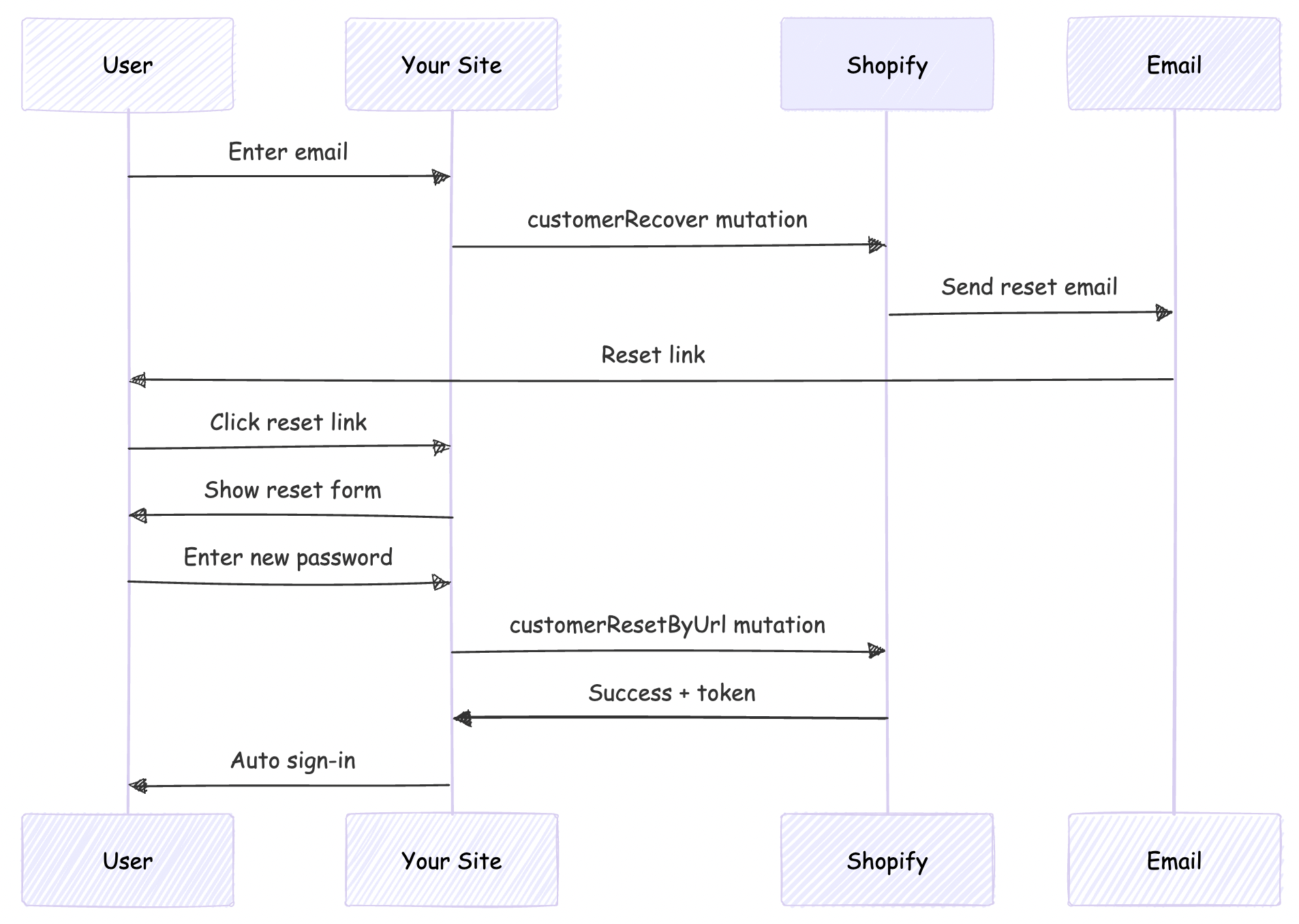
This scenario is applicable only if your headless site domain is different from that given as primary domain in Shopify
By default, Shopify's password reset emails point to the Shopify-hosted store (your-store.myshopify.com). For a headless storefront, we need these emails to point to your custom domain instead.
We'll solve this by:
First, create the GraphQL mutation file for customerRecover:
# src/integrations/shopify/customer-recover/customer-recover.shopify.graphql
mutation customerRecover($email: String!) {
  customerRecover(email: $email) {
    customerUserErrors {
      message
      field
    }
  }
}
This mutation triggers Shopify to send a password reset email to the customer.
Create the TypeScript integration function:
// src/integrations/shopify/customer-recover/index.ts
import {
  CustomerRecoverDocument,
  CustomerRecoverMutation,
  CustomerRecoverMutationVariables,
} from "@/generated/shopifySchemaTypes";
import createApolloClient from "@/integrations/shopify/shopify-apollo-client";

export const customerRecover = async (
  email: string,
): Promise<CustomerRecoverMutation | undefined> => {
  try {
    const client = createApolloClient();
    const { data } = await client.mutate<
      CustomerRecoverMutation,
      CustomerRecoverMutationVariables
    >({
      mutation: CustomerRecoverDocument,
      variables: { email },
    });

    if (!data) {
      throw new Error("No data returned from customerRecover mutation");
    }

    return data;
  } catch (error) {
    console.error("Error sending password reset email:", error);
  }
};
Note: Run your GraphQL codegen after creating the mutation file:
npm run codegen
Update your Shopify auth plugin to include the forgot password endpoint:
// src/lib/shopify-auth-plugin.ts
export type ShopifyForgotPasswordInput = {
  email: string;
};
import * as z from "zod";

const forgotPasswordSchema = z.object({
  email: z.email().min(1),
});
import { customerRecover } from "@/integrations/shopify/customer-recover";

export const shopifyAuthPlugin = () => {
  return {
    id: "shopify-auth",
    endpoints: {
      // ... existing signIn and signUp endpoints

      forgotPassword: createAuthEndpoint(
        "/shopify-auth/forgot-password",
        {
          method: "POST",
          body: forgotPasswordSchema,
        },
        async (ctx) => {
          const { email } = ctx.body;

          const result = await customerRecover(email);

          if (!result) {
            throw new APIError("BAD_REQUEST", {
              message: "Unable to send password reset email.",
            });
          }

          const payload = result.customerRecover;
          const userErrors = payload?.customerUserErrors ?? [];

          if (userErrors.length) {
            throw new APIError("BAD_REQUEST", {
              message:
                userErrors[0]?.message ||
                "Unable to send password reset email.",
            });
          }

          return ctx.json({ ok: true });
        },
      ),
    },
  } satisfies BetterAuthPlugin;
};
Update your auth client plugin to expose the forgot password action:
// src/lib/shopify-auth-client.ts
import type {
  ShopifyForgotPasswordInput,
} from "@/lib/shopify-auth-plugin";

export const shopifyAuthClientPlugin = () => {
  return {
    id: "shopify-auth",
    $InferServerPlugin: {} as ReturnType<typeof shopifyAuthPlugin>,
    getActions: ($fetch) => {
      return {
        // ... existing shopifySignIn and shopifySignUp

        shopifyForgotPassword: async (
          data: ShopifyForgotPasswordInput,
          fetchOptions?: BetterFetchOption,
        ) => {
          return $fetch("/shopify-auth/forgot-password", {
            method: "POST",
            body: data,
            ...fetchOptions,
          });
        },
      };
    },
  } satisfies BetterAuthClientPlugin;
};
Create a user-friendly forgot password page:
// src/app/account/forgot-password/page.tsx
"use client";

import React, { useState } from "react";
import Link from "next/link";
import { authClient } from "@/lib/auth-client";

export default function ForgotPasswordPage() {
  const [loading, setLoading] = useState(false);
  const [error, setError] = useState<string | null>(null);
  const [success, setSuccess] = useState(false);

  async function onSubmit(e: React.FormEvent<HTMLFormElement>) {
    e.preventDefault();
    setError(null);
    setSuccess(false);
    setLoading(true);

    const form = e.currentTarget;
    const email = (form.elements.namedItem("email") as HTMLInputElement).value;

    try {
      const result = await authClient.shopifyForgotPassword({ email });

      const shopifyError = (result as { error?: { message?: string } })?.error
        ?.message;
      if (shopifyError) {
        setError(shopifyError || "Unable to send password reset email.");
        return;
      }

      const shopifyData = (result as { data?: { ok?: boolean } })?.data;
      if (!shopifyData?.ok) {
        setError("Unable to send password reset email.");
        return;
      }

      setSuccess(true);
    } catch {
      setError("Unable to send password reset email. Please try again.");
    } finally {
      setLoading(false);
    }
  }

  return (
    <div className="border-box px-5 py-8 lg:px-10 min-h-[60vh] flex items-center justify-center">
      <div className="w-full max-w-md">
        <h1 className="text-2xl font-semibold text-gray-900 text-center mb-4">
          Forgot Password
        </h1>
        <p className="text-gray-500 text-center mb-8 font-light">
          Enter your email address and we'll send you a link to reset your
          password.
        </p>

        {success ? (
          <div className="bg-green-50 border border-green-200 text-green-800 px-4 py-3 rounded">
            <p className="text-sm">
              If an account exists with this email, you will receive a password
              reset link shortly.
            </p>
          </div>
        ) : (
          <form className="flex flex-col gap-4" onSubmit={onSubmit}>
            <div className="flex flex-col gap-2">
              <label htmlFor="email" className="text-gray-900">
                Email
              </label>
              <input
                type="email"
                id="email"
                name="email"
                className="border border-gray-200 px-4 py-2 text-gray-900 focus:outline-none focus:border-gray-400"
                placeholder="you@example.com"
                required
              />
            </div>

            {error && (
              <p className="text-sm text-red-600" role="alert">
                {error}
              </p>
            )}

            <button
              type="submit"
              disabled={loading}
              className="mt-4 bg-gray-900 text-white py-3 px-4 hover:bg-gray-800 transition-colors cursor-pointer uppercase disabled:opacity-50 disabled:cursor-not-allowed"
            >
              {loading ? "Sending..." : "Send Reset Link"}
            </button>
          </form>
        )}

        <div className="mt-6 flex flex-col items-center gap-4">
          <Link
            href="/account/login"
            className="text-gray-600 hover:text-gray-900 font-light"
          >
            Back to Login
          </Link>
        </div>
      </div>
    </div>
  );
}
This is the crucial step that redirects users to your site instead of Shopify's hosted store.
Find the line containing the reset password link (typically):
{{ customer.reset_password_url }}
Replace it with:
https://your-vercel-domain.com/account/reset-password?url={{ customer.reset_password_url | url_encode }}
Example:
<!-- Before -->
<a href="{{ customer.reset_password_url }}">Reset your password</a>

<!-- After -->
<a href="https://headless-shopify-site.vercel.app/account/reset-password?url={{ customer.reset_password_url | url_encode }}">Reset your password</a>
Replace headless-shopify-site.vercel.app with your actual domain.
Now implement the actual password reset page that users land on after clicking the email link.
# src/integrations/shopify/customer-reset-by-url/customer-reset-by-url.shopify.graphql
mutation customerResetByUrl($password: String!, $resetUrl: URL!) {
  customerResetByUrl(password: $password, resetUrl: $resetUrl) {
    customer {
      id
      email
      firstName
      lastName
    }
    customerAccessToken {
      accessToken
      expiresAt
    }
    customerUserErrors {
      message
      field
    }
  }
}
// src/integrations/shopify/customer-reset-by-url/index.ts
import {
  CustomerResetByUrlDocument,
  CustomerResetByUrlMutation,
  CustomerResetByUrlMutationVariables,
} from "@/generated/shopifySchemaTypes";
import createApolloClient from "@/integrations/shopify/shopify-apollo-client";

export const customerResetByUrl = async (
  password: string,
  resetUrl: string,
): Promise<CustomerResetByUrlMutation | undefined> => {
  try {
    const client = createApolloClient();
    const { data } = await client.mutate<
      CustomerResetByUrlMutation,
      CustomerResetByUrlMutationVariables
    >({
      mutation: CustomerResetByUrlDocument,
      variables: { password, resetUrl },
    });

    if (!data) {
      throw new Error("No data returned from customerResetByUrl mutation");
    }

    return data;
  } catch (error) {
    console.error("Error resetting password:", error);
  }
};
Run codegen again:
npm run codegen
// src/lib/shopify-auth-plugin.ts
export type ShopifyResetPasswordInput = {
  password: string;
  resetUrl: string;
};
const resetPasswordSchema = z.object({
  password: z.string().min(5),
  resetUrl: z.string().url(),
});
import { customerResetByUrl } from "@/integrations/shopify/customer-reset-by-url";

export const shopifyAuthPlugin = () => {
  return {
    id: "shopify-auth",
    endpoints: {
      // ... existing endpoints

      resetPassword: createAuthEndpoint(
        "/shopify-auth/reset-password",
        {
          method: "POST",
          body: resetPasswordSchema,
        },
        async (ctx) => {
          const { password, resetUrl } = ctx.body;

          const result = await customerResetByUrl(password, resetUrl);

          if (!result) {
            throw new APIError("BAD_REQUEST", {
              message: "Unable to reset password.",
            });
          }

          const payload = result.customerResetByUrl;
          const userErrors = payload?.customerUserErrors ?? [];
          const token = payload?.customerAccessToken?.accessToken;
          const expiresAt = payload?.customerAccessToken?.expiresAt;

          if (userErrors.length || !token) {
            throw new APIError("BAD_REQUEST", {
              message: userErrors[0]?.message || "Unable to reset password.",
            });
          }

          // Auto sign-in after successful password reset
          ctx.setCookie(SHOPIFY_CUSTOMER_TOKEN_COOKIE, token, {
            httpOnly: true,
            secure: process.env.NODE_ENV === "production",
            sameSite: "lax",
            path: "/",
            expires: expiresAt ? new Date(expiresAt) : undefined,
          });

          return ctx.json({ ok: true });
        },
      ),
    },
  } satisfies BetterAuthPlugin;
};
// src/lib/shopify-auth-client.ts
import type {
  ShopifyResetPasswordInput,
} from "@/lib/shopify-auth-plugin";

export const shopifyAuthClientPlugin = () => {
  return {
    id: "shopify-auth",
    getActions: ($fetch) => {
      return {
        // ... existing actions

        shopifyResetPassword: async (
          data: ShopifyResetPasswordInput,
          fetchOptions?: BetterFetchOption,
        ) => {
          return $fetch("/shopify-auth/reset-password", {
            method: "POST",
            body: data,
            ...fetchOptions,
          });
        },
      };
    },
  } satisfies BetterAuthClientPlugin;
};
Create a comprehensive reset password page with validation:
// src/app/account/reset-password/page.tsx
"use client";

import React, { useState, useEffect } from "react";
import Link from "next/link";
import { useSearchParams } from "next/navigation";
import { authClient } from "@/lib/auth-client";

export default function ResetPasswordPage() {
  const searchParams = useSearchParams();
  const [loading, setLoading] = useState(false);
  const [error, setError] = useState<string | null>(null);
  const [success, setSuccess] = useState(false);
  const [resetUrl, setResetUrl] = useState<string | null>(null);

  useEffect(() => {
    // Extract the full reset URL from query params
    const url = searchParams.get("url");
    if (url) {
      setResetUrl(decodeURIComponent(url));
    } else {
      setError("Invalid or missing reset link.");
    }
  }, [searchParams]);

  async function onSubmit(e: React.FormEvent<HTMLFormElement>) {
    e.preventDefault();
    setError(null);
    setLoading(true);

    const form = e.currentTarget;
    const password = (form.elements.namedItem("password") as HTMLInputElement)
      .value;
    const confirmPassword = (
      form.elements.namedItem("confirmPassword") as HTMLInputElement
    ).value;

    // Validate passwords match
    if (password !== confirmPassword) {
      setError("Passwords do not match.");
      setLoading(false);
      return;
    }

    // Validate password length
    if (password.length < 5) {
      setError("Password must be at least 5 characters.");
      setLoading(false);
      return;
    }

    if (!resetUrl) {
      setError("Invalid reset link.");
      setLoading(false);
      return;
    }

    try {
      const result = await authClient.shopifyResetPassword({
        password,
        resetUrl,
      });

      const shopifyError = (result as { error?: { message?: string } })?.error
        ?.message;
      if (shopifyError) {
        setError(shopifyError || "Unable to reset password.");
        return;
      }

      const shopifyData = (result as { data?: { ok?: boolean } })?.data;
      if (!shopifyData?.ok) {
        setError("Unable to reset password.");
        return;
      }

      setSuccess(true);

      // Redirect to home after successful reset and auto sign-in
      setTimeout(() => {
        window.location.href = "/";
      }, 2000);
    } catch {
      setError("Unable to reset password. Please try again.");
    } finally {
      setLoading(false);
    }
  }

  if (!resetUrl && !error) {
    return (
      <div className="border-box px-5 py-8 lg:px-10 min-h-[60vh] flex items-center justify-center">
        <div className="w-full max-w-md text-center">
          <p className="text-gray-500">Loading...</p>
        </div>
      </div>
    );
  }

  return (
    <div className="border-box px-5 py-8 lg:px-10 min-h-[60vh] flex items-center justify-center">
      <div className="w-full max-w-md">
        <h1 className="text-2xl font-semibold text-gray-900 text-center mb-4">
          Reset Password
        </h1>
        <p className="text-gray-500 text-center mb-8 font-light">
          Enter your new password below.
        </p>

        {success ? (
          <div className="bg-green-50 border border-green-200 text-green-800 px-4 py-3 rounded">
            <p className="text-sm">
              Your password has been reset successfully! Redirecting...
            </p>
          </div>
        ) : (
          <form className="flex flex-col gap-4" onSubmit={onSubmit}>
            <div className="flex flex-col gap-2">
              <label htmlFor="password" className="text-gray-900">
                New Password
              </label>
              <input
                type="password"
                id="password"
                name="password"
                className="border border-gray-200 px-4 py-2 text-gray-900 focus:outline-none focus:border-gray-400"
                placeholder="••••••••"
                minLength={5}
                required
                disabled={!resetUrl}
              />
            </div>

            <div className="flex flex-col gap-2">
              <label htmlFor="confirmPassword" className="text-gray-900">
                Confirm New Password
              </label>
              <input
                type="password"
                id="confirmPassword"
                name="confirmPassword"
                className="border border-gray-200 px-4 py-2 text-gray-900 focus:outline-none focus:border-gray-400"
                placeholder="••••••••"
                minLength={5}
                required
                disabled={!resetUrl}
              />
            </div>

            {error && (
              <p className="text-sm text-red-600" role="alert">
                {error}
              </p>
            )}

            <button
              type="submit"
              disabled={loading || !resetUrl}
              className="mt-4 bg-gray-900 text-white py-3 px-4 hover:bg-gray-800 transition-colors cursor-pointer uppercase disabled:opacity-50 disabled:cursor-not-allowed"
            >
              {loading ? "Resetting..." : "Reset Password"}
            </button>
          </form>
        )}

        <div className="mt-6 flex flex-col items-center gap-4">
          <Link
            href="/account/login"
            className="text-gray-600 hover:text-gray-900 font-light"
          >
            Back to Login
          </Link>
        </div>
      </div>
    </div>
  );
}
Your final project structure should look like this:
src/
├── app/
│   └── account/
│       ├── forgot-password/
│       │   └── page.tsx          # Forgot password form
│       └── reset-password/
│           └── page.tsx           # Reset password form
├── integrations/
│   └── shopify/
│       ├── customer-recover/
│       │   ├── customer-recover.shopify.graphql
│       │   └── index.ts
│       └── customer-reset-by-url/
│           ├── customer-reset-by-url.shopify.graphql
│           └── index.ts
└── lib/
    ├── auth-client.ts             # Better-Auth client
    ├── shopify-auth-plugin.ts     # Server plugin with endpoints
    └── shopify-auth-client.ts     # Client plugin with actions
You now have a complete, secure password recovery system for your headless Shopify storefront!
If you have questions or run into issues implementing this flow, feel free to:
Happy coding! 🚀
Authentication is a critical component of any e-commerce application. When building a headless Shopify storefront with Next.js, you need a robust authentication solution that integrates seamlessly with Shopify's customer API. In this article, we'll explore how to implement authentication using Better-Auth, a modern authentication library for Next.js applications.
Live Demo: https://headless-shopify-site.vercel.app/
Better-Auth is a flexible, type-safe authentication library for Next.js that provides a plugin-based architecture. It offers:
When building a headless Shopify storefront, you need to integrate with Shopify's Customer API for authentication. Better-Auth's plugin system makes it perfect for this use case because:
Our authentication implementation consists of several key components:
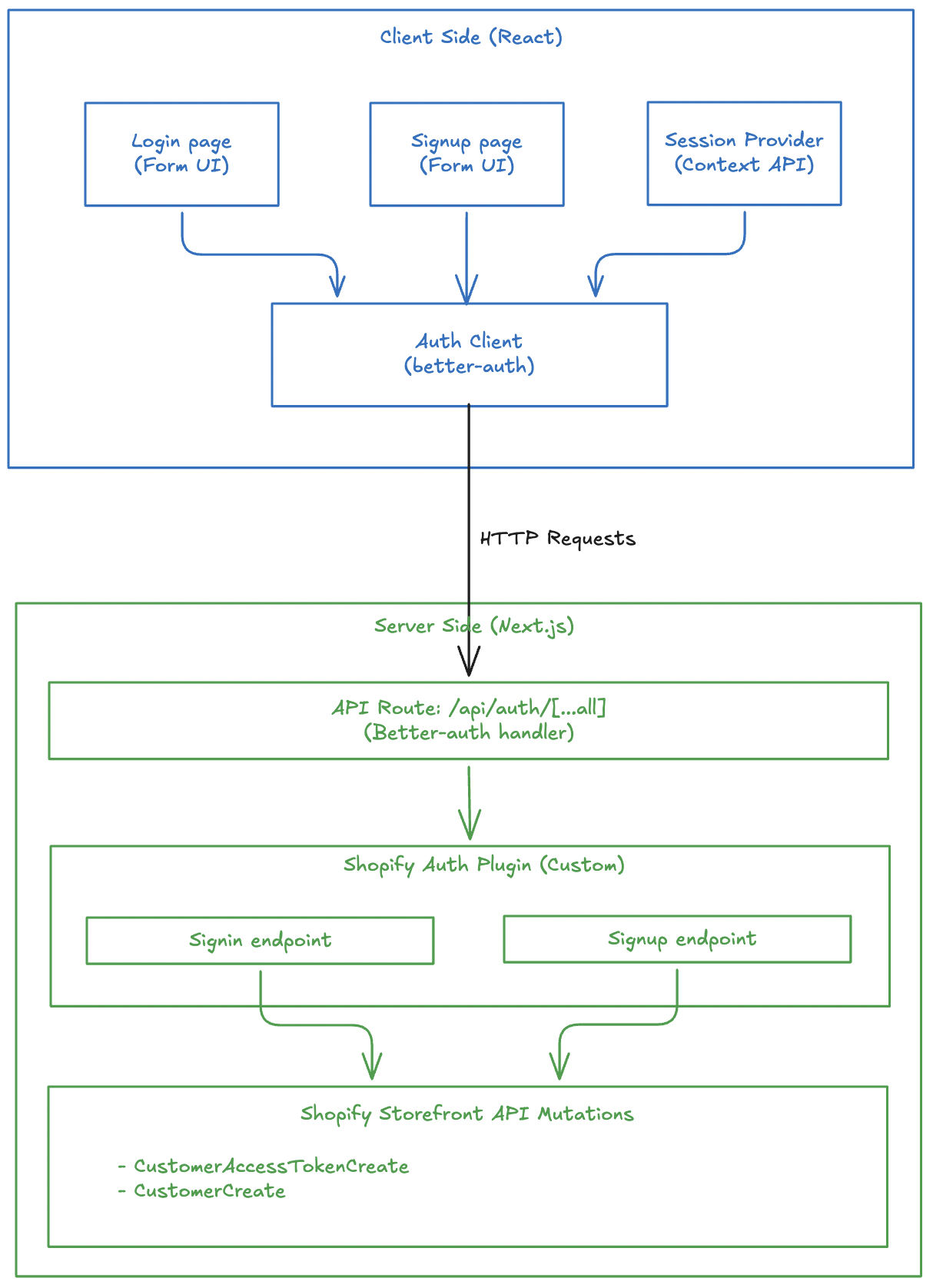
Before implementing authentication with Better-Auth, ensure you have:
customerAccessTokenCreate, customerCreate, etc.) via Shopify's Storefront APIThis article focuses specifically on integrating Better-Auth with Shopify and does not cover Next.js setup or Shopify API integration basics.
First, install the required dependencies:
pnpm add better-auth
# or
npm install better-auth
# or
yarn add better-auth
Add the required environment variable for Better-Auth:
# .env
BETTER_AUTH_SECRET=your_secret_key_here
Generate a secure secret key using:
openssl rand -base64 32
Your project might have other environment variables like Shopify Graphql endpoint, storefront access token. I am not writing everything here to stick to the auth logic.
The Shopify auth plugin is the heart of our authentication system. It creates custom endpoints that integrate with Shopify's Customer API.
First, define TypeScript types for sign-in and sign-up inputs:
// src/lib/shopify-auth-plugin.ts
export type ShopifySignInInput = {
  email: string;
  password: string;
};

export type ShopifySignUpInput = {
  email: string;
  password: string;
  firstName?: string;
  lastName?: string;
  acceptsMarketing?: boolean;
  autoSignIn?: boolean;
};
You might not need this if you are not using TypeScript.
Use Zod to validate incoming requests:
import * as z from "zod";

const signInSchema = z.object({
  email: z.email().min(1),
  password: z.string().min(1),
});

const signUpSchema = z.object({
  email: z.email().min(1),
  password: z.string().min(1),
  firstName: z.string().min(1).optional(),
  lastName: z.string().min(1).optional(),
  acceptsMarketing: z.boolean().optional(),
  autoSignIn: z.boolean().optional(),
});
Zod is optional. You can skip this if you are not concerned about input validation. Not a mandatory thing for better-auth.
The sign-in endpoint calls Shopify's customerAccessTokenCreate mutation and stores the token in an HTTP-only cookie:
import { APIError, createAuthEndpoint } from "better-auth/api";

const SHOPIFY_CUSTOMER_TOKEN_COOKIE = "shopifyCustomerAccessToken";

export const shopifyAuthPlugin = () => {
  return {
    id: "shopify-auth",
    endpoints: {
      signIn: createAuthEndpoint(
        "/shopify-auth/sign-in",
        {
          method: "POST",
          body: signInSchema,
        },
        async (ctx) => {
          const { email, password } = ctx.body;

          // Call Shopify's customer access token create mutation
          const result = await customerAccessTokenCreate({ email, password });

          if (!result) {
            throw new APIError("BAD_REQUEST", {
              message: "Shopify sign-in failed.",
            });
          }

          // Extract token and errors from response
          const payload = result.customerAccessTokenCreate;
          const userErrors = payload?.customerUserErrors ?? [];
          const token = payload?.customerAccessToken?.accessToken;
          const expiresAt = payload?.customerAccessToken?.expiresAt;

          if (userErrors.length || !token) {
            throw new APIError("UNAUTHORIZED", {
              message: userErrors[0]?.message || "Invalid email or password.",
            });
          }

          // Store token in secure HTTP-only cookie
          ctx.setCookie(SHOPIFY_CUSTOMER_TOKEN_COOKIE, token, {
            httpOnly: true,
            secure: process.env.NODE_ENV === "production",
            sameSite: "lax",
            path: "/",
            expires: expiresAt ? new Date(expiresAt) : undefined,
          });

          return ctx.json({ ok: true });
        },
      ),
      // ... signUp endpoint
    },
  };
};
The sign-in flow:
customerAccessTokenCreate mutationI have not given the details of customerAccessTokenCreate() function to keep this article stick to auth related logic. You can visit the Github repo of headless-shopify to get that function and see how it works.
This section should go inside the endpoints object, just like signIn.
The sign-up endpoint creates a new customer in Shopify and optionally signs them in:
signUp: createAuthEndpoint(
  "/shopify-auth/sign-up",
  {
    method: "POST",
    body: signUpSchema,
  },
  async (ctx) => {
    const { email, password, firstName, lastName, acceptsMarketing, autoSignIn } = ctx.body;

    // Create customer in Shopify
    const result = await customerCreate({
      email,
      password,
      firstName,
      lastName,
      acceptsMarketing,
    });

    const payload = result.customerCreate;
    const userErrors = payload?.customerUserErrors ?? [];
    const customer = payload?.customer;

    if (userErrors.length || !customer) {
      throw new APIError("BAD_REQUEST", {
        message: userErrors[0]?.message || "Unable to create customer.",
      });
    }

    // Optionally sign in the user immediately after signup
    if (autoSignIn) {
      const signInResult = await customerAccessTokenCreate({ email, password });
      const token = signInResult?.customerAccessTokenCreate?.customerAccessToken?.accessToken;

      if (token) {
        ctx.setCookie(SHOPIFY_CUSTOMER_TOKEN_COOKIE, token, {
          httpOnly: true,
          secure: process.env.NODE_ENV === "production",
          sameSite: "lax",
          path: "/",
        });
      }
    }

    return ctx.json({ ok: true, customer });
  },
),
The sign-up flow:
customerCreate mutationautoSignIn is true, immediately signs in the userCreate the Better-Auth server instance:
// src/lib/auth.ts
import { betterAuth } from "better-auth";
import { nextCookies } from "better-auth/next-js";
import { shopifyAuthPlugin } from "@/lib/shopify-auth-plugin";

export const auth = betterAuth({
  plugins: [nextCookies(), shopifyAuthPlugin()],
});
Create a catch-all API route for Better-Auth:
// src/app/api/auth/[...all]/route.ts
import { auth } from "@/lib/auth";
import { toNextJsHandler } from "better-auth/next-js";

export const { GET, POST } = toNextJsHandler(auth);
This creates the following endpoints:
POST /api/auth/shopify-auth/sign-in - Sign inPOST /api/auth/shopify-auth/sign-up - Sign upA better-auth client-side plugin consumes the APIs created by server-side plugin.
Create the client-side plugin:
// src/lib/shopify-auth-client.ts
import type { BetterAuthClientPlugin } from "better-auth/client";
import type { BetterFetchOption } from "@better-fetch/fetch";
import type {
  shopifyAuthPlugin,
  ShopifySignInInput,
  ShopifySignUpInput,
} from "@/lib/shopify-auth-plugin";

export const shopifyAuthClientPlugin = () => {
  return {
    id: "shopify-auth",
    $InferServerPlugin: {} as ReturnType<typeof shopifyAuthPlugin>,
    getActions: ($fetch) => {
      return {
        shopifySignIn: async (
          data: ShopifySignInInput,
          fetchOptions?: BetterFetchOption,
        ) => {
          return $fetch("/shopify-auth/sign-in", {
            method: "POST",
            body: data,
            ...fetchOptions,
          });
        },
        shopifySignUp: async (
          data: ShopifySignUpInput,
          fetchOptions?: BetterFetchOption,
        ) => {
          return $fetch("/shopify-auth/sign-up", {
            method: "POST",
            body: data,
            ...fetchOptions,
          });
        },
      };
    },
  } satisfies BetterAuthClientPlugin;
};
Create the auth client instance:
// src/lib/auth-client.ts
import { createAuthClient } from "better-auth/react";
import { shopifyAuthClientPlugin } from "@/lib/shopify-auth-client";

export const authClient = createAuthClient({
  plugins: [shopifyAuthClientPlugin()],
});
Now let's build the login UI that uses our auth client.
// src/app/account/login/page.tsx
"use client";

import React, { useState } from "react";
import { authClient } from "@/lib/auth-client";
import { useRouter } from "next/navigation";

export default function LoginPage() {
  const [loading, setLoading] = useState(false);
  const [error, setError] = useState<string | null>(null);
  const router = useRouter();
  // ... form handler
}
The form handler calls the shopifySignIn method from our auth client:
async function onSubmit(e: React.FormEvent<HTMLFormElement>) {
  e.preventDefault();
  setError(null);
  setLoading(true);

  const form = e.currentTarget;
  const email = (form.elements.namedItem("email") as HTMLInputElement).value;
  const password = (form.elements.namedItem("password") as HTMLInputElement)
    .value;

  try {
    const shopifyAuth = await authClient.shopifySignIn({
      email,
      password,
    });

    // Check for errors in the response
    const shopifyError = (shopifyAuth as { error?: { message?: string } })
      ?.error?.message;
    if (shopifyError) {
      setError(shopifyError || "Invalid email or password.");
      return;
    }

    // Verify successful sign-in
    const shopifyData = (shopifyAuth as { data?: { ok?: boolean } })?.data;
    if (!shopifyData?.ok) {
      setError("Invalid email or password.");
      return;
    }

    // Redirect to account page on success
    router.push("/account");
  } catch (err) {
    setError("An error occurred. Please try again.");
  } finally {
    setLoading(false);
  }
}
Create a simple, accessible form:
return (
  <div className="max-w-md mx-auto mt-8 p-6">
    <h1 className="text-2xl font-bold mb-6">Sign In</h1>

    <form onSubmit={onSubmit} className="space-y-4">
      <div>
        <label htmlFor="email" className="block text-sm font-medium mb-2">
          Email
        </label>
        <input
          id="email"
          name="email"
          type="email"
          required
          className="w-full px-3 py-2 border rounded-md"
        />
      </div>

      <div>
        <label htmlFor="password" className="block text-sm font-medium mb-2">
          Password
        </label>
        <input
          id="password"
          name="password"
          type="password"
          required
          className="w-full px-3 py-2 border rounded-md"
        />
      </div>

      {error && <div className="text-red-600 text-sm">{error}</div>}

      <button
        type="submit"
        disabled={loading}
        className="w-full bg-blue-600 text-white py-2 rounded-md"
      >
        {loading ? "Signing in..." : "Sign In"}
      </button>
    </form>
  </div>
);
Similarly, let's create the signup page that allows new users to create accounts.
// src/app/account/register/page.tsx
"use client";

import React, { useState } from "react";
import { authClient } from "@/lib/auth-client";

export default function RegisterPage() {
  const [loading, setLoading] = useState(false);
  const [error, setError] = useState<string | null>(null);
  // ... form handler
}
The form handler calls shopifySignUp with the new customer information:
async function onSubmit(e: React.FormEvent<HTMLFormElement>) {
  e.preventDefault();
  setError(null);
  setLoading(true);

  const form = e.currentTarget;
  const firstName = (form.elements.namedItem("firstName") as HTMLInputElement)
    .value;
  const lastName = (form.elements.namedItem("lastName") as HTMLInputElement)
    .value;
  const email = (form.elements.namedItem("email") as HTMLInputElement).value;
  const password = (form.elements.namedItem("password") as HTMLInputElement)
    .value;

  try {
    const shopifyAuth = await authClient.shopifySignUp({
      email,
      password,
      firstName,
      lastName,
      acceptsMarketing: false,
      autoSignIn: true, // Automatically sign in after signup
    });

    // Check for errors
    const shopifyError = (shopifyAuth as { error?: { message?: string } })
      ?.error?.message;
    if (shopifyError) {
      setError(shopifyError || "Unable to create account.");
      return;
    }

    // Verify success
    const shopifyData = (shopifyAuth as { data?: { ok?: boolean } })?.data;
    if (!shopifyData?.ok) {
      setError("Unable to create account.");
      return;
    }

    // Redirect to home page on success
    window.location.href = "/";
  } catch {
    setError("Unable to create account. Please try again.");
  } finally {
    setLoading(false);
  }
}
Note the autoSignIn: true option - this automatically signs in the user after successful registration, providing a seamless onboarding experience.
Create a registration form with fields for first name, last name, email, and password:
return (
  <div className="max-w-md mx-auto mt-8 p-6">
    <h1 className="text-2xl font-bold mb-6">Create Account</h1>

    <form onSubmit={onSubmit} className="space-y-4">
      <div>
        <label htmlFor="firstName" className="block text-sm font-medium mb-2">
          First Name
        </label>
        <input
          id="firstName"
          name="firstName"
          type="text"
          required
          className="w-full px-3 py-2 border rounded-md"
        />
      </div>

      <div>
        <label htmlFor="lastName" className="block text-sm font-medium mb-2">
          Last Name
        </label>
        <input
          id="lastName"
          name="lastName"
          type="text"
          required
          className="w-full px-3 py-2 border rounded-md"
        />
      </div>

      <div>
        <label htmlFor="email" className="block text-sm font-medium mb-2">
          Email
        </label>
        <input
          id="email"
          name="email"
          type="email"
          required
          className="w-full px-3 py-2 border rounded-md"
        />
      </div>

      <div>
        <label htmlFor="password" className="block text-sm font-medium mb-2">
          Password
        </label>
        <input
          id="password"
          name="password"
          type="password"
          required
          className="w-full px-3 py-2 border rounded-md"
        />
      </div>

      {error && <div className="text-red-600 text-sm">{error}</div>}

      <button
        type="submit"
        disabled={loading}
        className="w-full bg-blue-600 text-white py-2 rounded-md"
      >
        {loading ? "Creating Account..." : "Create Account"}
      </button>
    </form>
  </div>
);
A session provider manages user authentication state across your application using React Context.
// src/providers/session-provider.tsx
"use client";

import {
  createContext,
  useCallback,
  useContext,
  useEffect,
  useState,
} from "react";
import { getCurrentUser } from "@/lib/shopify/queries/customers/getCurrentUser";

type SessionUser = Awaited<ReturnType<typeof getCurrentUser>>;

type SessionContextValue = {
  user: SessionUser;
  loading: boolean;
  error: string | null;
  refresh: () => Promise<void>;
};
const SessionContext = createContext<SessionContextValue | undefined>(
  undefined,
);

export function SessionProvider({ children }: { children: React.ReactNode }) {
  const [user, setUser] = useState<SessionUser>(null);
  const [loading, setLoading] = useState(true);
  const [error, setError] = useState<string | null>(null);

  const refresh = useCallback(async () => {
    try {
      setLoading(true);
      setError(null);
      const currentUser = await getCurrentUser();
      setUser(currentUser);
    } catch (err) {
      setError(err instanceof Error ? err.message : "Failed to load user");
      setUser(null);
    } finally {
      setLoading(false);
    }
  }, []);

  useEffect(() => {
    refresh();
  }, [refresh]);

  return (
    <SessionContext.Provider value={{ user, loading, error, refresh }}>
      {children}
    </SessionContext.Provider>
  );
}
The provider automatically fetches the current user on mount and provides a refresh method to reload user data.
useSession() provides access to session-related data and functionality throughout your application.
export function useSession() {
  const context = useContext(SessionContext);
  if (context === undefined) {
    throw new Error("useSession must be used within a SessionProvider");
  }
  return context;
}
Add the SessionProvider to your root layout:
// src/app/layout.tsx
import { SessionProvider } from "@/providers/session-provider";

export default function RootLayout({
  children,
}: {
  children: React.ReactNode;
}) {
  return (
    <html lang="en">
      <body>
        <SessionProvider>{children}</SessionProvider>
      </body>
    </html>
  );
}
Use the useSession hook in any component to access authentication state:
"use client";

import { useSession } from "@/providers/session-provider";

export function UserProfile() {
  const { user, loading, error } = useSession();

  if (loading) return <div>Loading...</div>;
  if (error) return <div>Error: {error}</div>;
  if (!user) return <div>Not logged in</div>;

  return (
    <div>
      <h2>Welcome, {user.firstName}!</h2>
      <p>Email: {user.email}</p>
    </div>
  );
}
The session hook provides:
user - Current user data or nullloading - Boolean indicating if user data is being fetchederror - Error message if fetching failedrefresh() - Function to manually reload user dataThe access token is stored in an HTTP-only cookie, making it inaccessible to JavaScript:
ctx.setCookie(SHOPIFY_CUSTOMER_TOKEN_COOKIE, token, {
  httpOnly: true, // Prevents XSS attacks
  secure: process.env.NODE_ENV === "production", // HTTPS only in production
  sameSite: "lax", // CSRF protection
  path: "/",
  expires: expiresAt ? new Date(expiresAt) : undefined,
});
All inputs are validated using Zod schemas before processing:
const signInSchema = z.object({
  email: z.email().min(1),
  password: z.string().min(1),
});
Proper error handling prevents information leakage:
if (userErrors.length || !token) {
  throw new APIError("UNAUTHORIZED", {
    message: userErrors[0]?.message || "Invalid email or password.",
  });
}
Implementing authentication in a headless Shopify storefront using Better-Auth provides a secure, type-safe, and developer-friendly solution. The plugin-based architecture allows you to create custom authentication flows that integrate perfectly with Shopify's Customer API while maintaining security best practices.
The complete implementation includes:
You can find the complete implementation in the Headless Shopify repository.